
Introducing Pedal Settings: Save Your Tone, Share Your Sound!
Your pedalboard is more than a collection of pedals. Now you can keep track of the settings that make each sound your own.
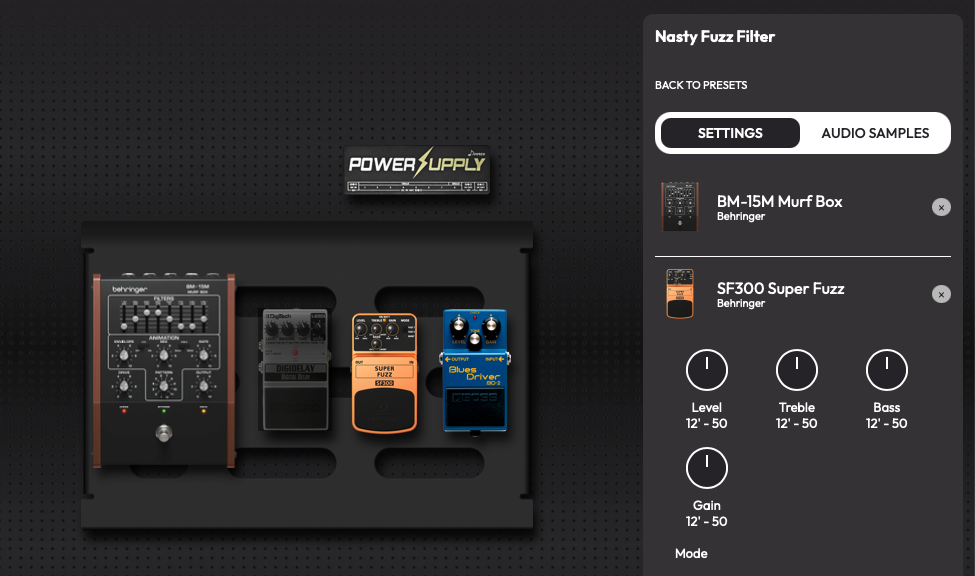
I'm proud to introduce Pedal Settings, a brand-new feature in Stompbox Garden that lets you save the settings of every pedal on your board, so you never lose that magical tone you managed to dial in once. And, of course, you can upload audio samples to go with it! The idea behind this feature is pretty simple: for an app that's all about guitar pedals, this place has been a little too quiet. For me, pedals are more than just little boxes full of knobs and switches. They're a way to get inspired, create music, play the songs we love, and, most importantly, have fun. At the end of the day, it's all about music. Pedal Settings .
Who is it for?
If you're the kind of person who finds that perfect tone, puts some gaffer tape on the pedal to mark the settings, and never touches those knobs again... well, this feature probably isn't for you. But if you're anything like me, you love experimenting with effects. You spend ages tweaking knobs and flipping switches until, suddenly, you find that killer tone! So what do you do? You take a photo. And, of course, a few weeks later, that photo is lost somewhere between 3,000 pictures of your family, your dog, holidays, drinks, and whatever you had for dinner last Tuesday. Sound familiar?
How does it work?
It's bloody simple.
- Create your pedalboard, if you haven't already.
- Click the Pedal Settings button at the bottom of the screen.
- Give your new setting a beautiful, meaningful name. Or something ridiculous. Your call.
- Select the pedals on your canvas and start adjusting the knobs, toggles, switches, and other controls to match your setup.
- Head over to the Audio Samples tab and upload a recording. It could be a full mix, a quick riff, just you playing around... whatever you want. You decide whether to keep it private or share it with the world.
- Add your rig details — guitar, amp, microphone, audio interface, or whatever else you used — so you know exactly how to recreate that sound later.
A place to get inspired
Now, if all that sounds like too much work, don't worry. You can also just explore what other people are creating. The Pedal Settings Catalog is a place to discover sounds, listen to audio samples, and get inspired by the community. Curious about a pedal and want to hear what it actually sounds like? Search for it and discover audio samples uploaded by other musicians, along with the exact settings they used. Maybe you'll discover a new sound, a pedal you've never heard of, or a completely different way to use one you already own. Simple as that.
Not perfect yet, but that's where you come in!
"Not everything in life is flowers," as my mom used to say. And she's right! There's still plenty to improve, and not every pedal has its controls available yet. Come on, I'm just one guy, and there are approximately 5,000,000,000 pedals out there! I've done my best to get as many ready as possible, but if yours is missing, you can request it directly through the feature, and I'll do my best to prioritize it. When I started Stompbox Garden, I wanted it to be more than just an app. I wanted to build a community of musicians, where we can share sounds, discover new pedals, learn from each other, and get inspired. And that's why I need you! Share your settings, upload your playing, experiment, and help break the silence around here. And if you have ideas, suggestions, or run into any issues, hit the Contact button or email me at [MAIL]. Your feedback really helps me decide what to improve next. The more we share, the more inspiring this place becomes. So let's make some noise!
View Pedal Settings →We're continuing to improve this feature, and feedback is always welcome.